
Are you ready to navigate the complex landscape of the Department of Housing and Urban Development (HUD)? You’ve come to the right place. Think of the HUD Resource Locator as your guiding star, helping you access a wide range of options right at your fingertips.
While it may seem overwhelming at first, we’re committed to breaking it down for you in an easy-to-understand manner. Our comprehensive, step-by-step guide will make maneuvering through this system as effortless as taking a leisurely walk in a peaceful park.
You Will Learn:
- How to utilize the HUD resource locator to discover affordable housing in your area.
- How to apply directly for HUD-sponsored affordable housing opportunities nearby. No more waiting around for PHA to process your application. Find out how to improve your chances of accessing housing assistance.
The government’s low-income housing initiative is overseen by the Department of Housing and Urban Development. You can find affordable housing programs in your vicinity by following the instructions below.
- Collaborate with your local HUD agency to specify your desired living area by clicking the Geolocation Button
 on the HUD resource locator here.
 - Look for the contact details of a public housing authority in your vicinity. You can start the application process via the housing authority’s website. If your geolocation isn’t enabled, search for PHA in your area using the Search Box.

- Explore HUD’s resource locator to identify the local housing authority close to you and what options are available in your preferred city.

- Utilizing the map on the HUD website allows you to tailor the search to your specifications and receive results relevant to each office, including;
- HUD Offices
- Low-income Housing Tax Credit Properties
- Public Housing Authorities
- Multifamily Properties Assisting (Elderly and Special Needs)
- USDA Rural Housing
- Public Housing Buildings
- Public Housing Developments
- Homeless Services/CoC Grantee Areas
Follow these steps:


5. To contact the nearest HUD office, simply click the Phone Button  and it will connect you with the nearest HUD office based on your enabled geo-location.
Affordable Housing Heroes Special Tip: Apply directly to Affordable Housing Apartments! Don’t wait for your local housing agency or authority to open waiting lists or respond to your application (many applicants aren’t aware of this, but following the steps outlined below can significantly enhance your journey and chances of being approved for housing assistance).
- If you’re frustrated with your local Public Housing Authority (PHA), which may be overwhelmed and slow in responding to Housing Voucher Applicants, taking the initiative to apply directly to Low Income Housing Tax Credit Properties via the HUD resource locator should be your next move.
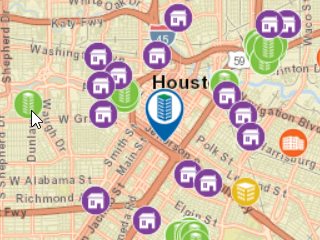
- Access the HUD resource locator and select the first option “Find Affordable Housing Opportunities Near ME.” Look for purple icons on the map denoting “Low Income Tax Credit Properties” and click on properties that are convenient for you. Apply to as many as you feel comfortable with.
- Reach out to the property management company. HUD may only provide the property’s name, so you’ll need to look it up online to find the website and contact details.
- Each property will have its own eligibility criteria, making it essential to read through the application thoroughly and supply all required documentation. You don’t need to be approved for a HUD voucher to apply, but you will have to meet the property’s unique approval process.
- Low-income Housing Tax Credit Properties will also accept (HCV) Housing
Choice Vouchers! If you’ve already received approval from the PHA for a Section 8 voucher, this is an excellent opportunity to connect with landlords who accept your voucher. Reach out to the property for confirmation and start your application process. - If you do not have a voucher, you can directly reach out to Tax Credit Properties and apply at the apartment building or leasing company. This allows you to bypass waiting for a response from the PHA regarding your Section 8 application, enabling you to actively seek affordable housing by applying to each tax credit property in your vicinity!
FAQ’s
Do I need to create an account to use the HUD Resource Locator?
No, an account is not necessary to utilize the HUD Resource Locator. This tool is freely available to the public and provided by HUD.
Is the HUD Resource Locator available on mobile devices?
Yes, the HUD Resource Locator functions quite well on mobile devices as well. By simply entering your location or allowing your device’s GPS to assist, you can easily discover nearby resources. The information is presented in a user-friendly format optimized for mobile use. Additionally, you can filter the results according to your specific needs or preferences.
Is the HUD Resource Locator available in languages other than English?
Indeed, the HUD Resource Locator caters to users beyond just English-speaking individuals. If you are more comfortable in Spanish, you’ll be pleased to know there is a Spanish version available.
For more information about this app, you can check out the HUD’s Official User Manual.
To access the app, click here.